The JavaScript Rendering Gap: Why AI Can't See Your Best Content

5 minutes

TL;DR
🚫 Most AI crawlers don't run JavaScript. GPTBot, ClaudeBot, and PerplexityBot fetch raw HTML and extract text from the initial markup. They don't execute scripts, wait for rendering, or retry
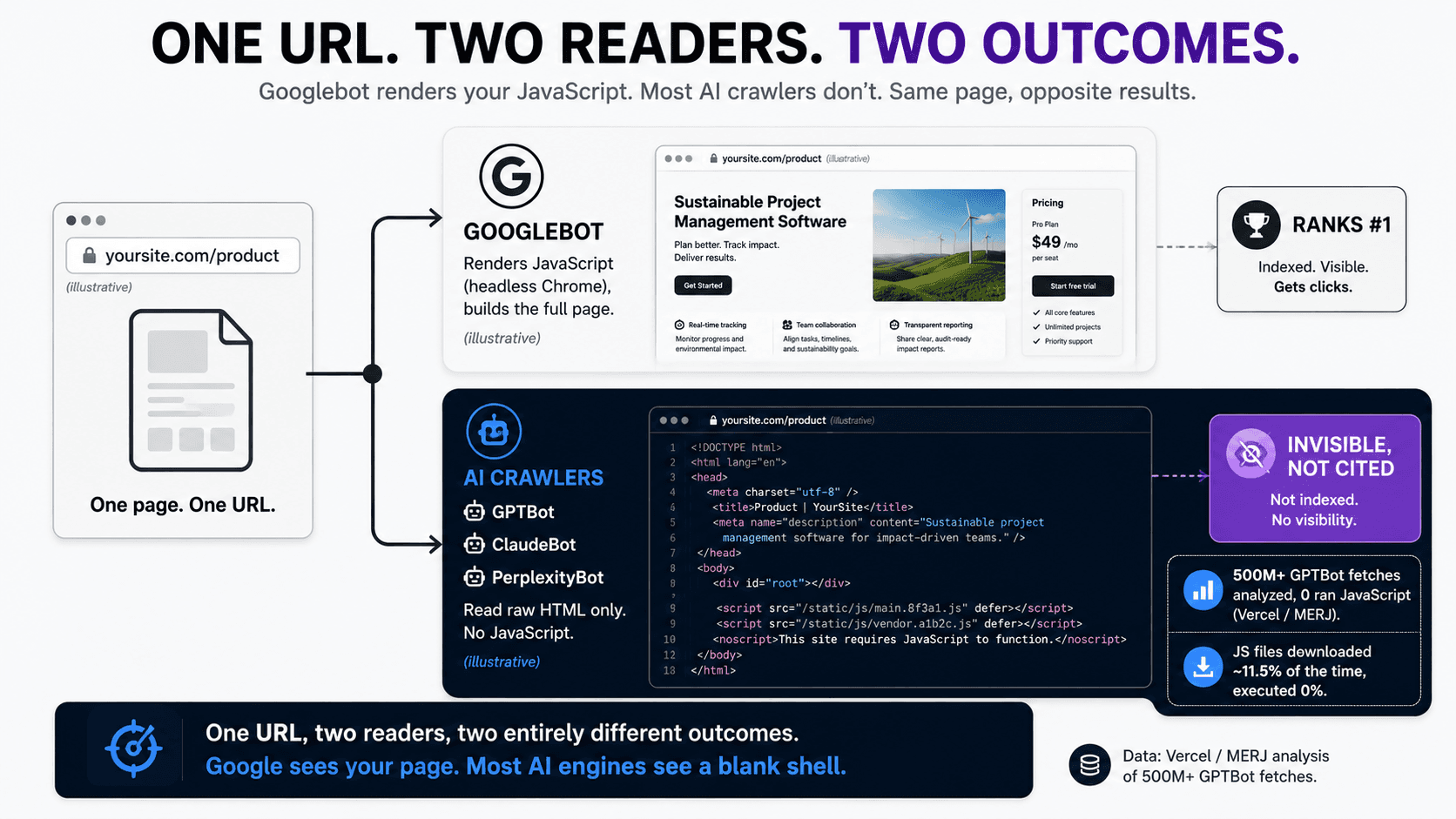
📊 The data is overwhelming. A Vercel and MERJ analysis of more than 500 million GPTBot fetches found zero evidence of JavaScript execution. Even when GPTBot downloaded JavaScript files, it didn't run them
🥇 Ranking #1 and being invisible can both be true. A client-rendered page can rank number one on Google while being completely blank to every other AI search system, because Google renders JavaScript and the AI crawlers don't
🎯 Your highest-value pages are the most exposed. Product pages, comparison pages, FAQ and documentation pages, and category pages are both the most citation-valuable and the most likely to load content dynamically
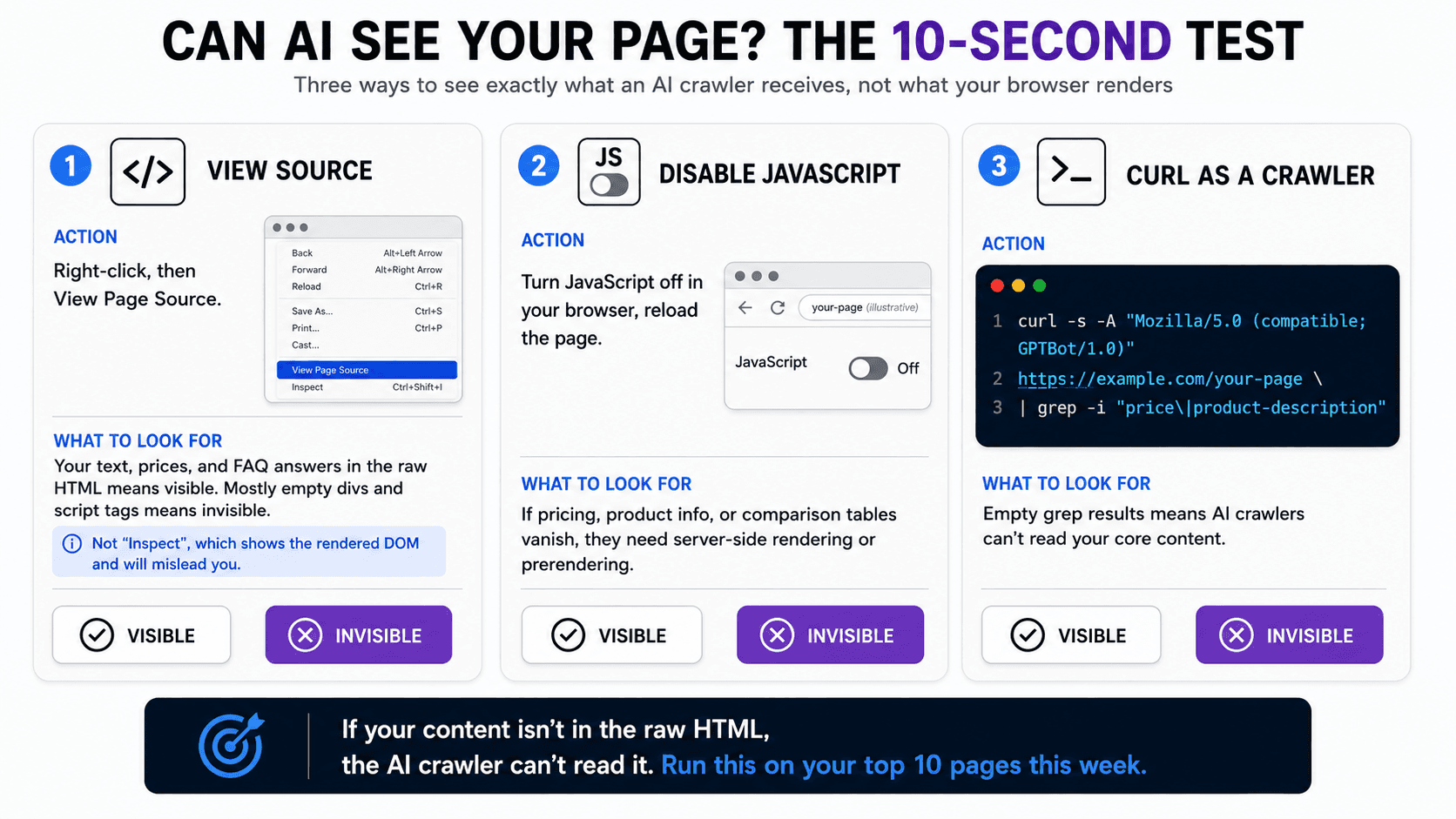
🔍 The test takes ten seconds. View the page source, or load the page with JavaScript disabled, or curl it. If your core content isn't in the raw HTML, AI can't read it
🔧 The fix is server-side rendering, static generation, or prerendering. Google's own JavaScript rendering does not transfer to AI crawlers, so the SEO work you did for Googlebot doesn't solve this
⚙️ Only Google-Extended renders JavaScript. Gemini's crawler inherits Googlebot's rendering engine; every other major AI crawler reads raw HTML only

Zach Chmael
CMO, Averi
"We built Averi around the exact workflow we've used to scale our web traffic over 6000% in the last 6 months."
Your content should be working harder.
Averi's content engine builds Google entity authority, drives AI citations, and scales your visibility so you can get more customers.
The JavaScript Rendering Gap: Why AI Can't See Your Best Content
Your best page might be invisible to AI.
Not low-ranked. Not poorly optimized. Invisible, as in a blank shell, as far as ChatGPT, Claude, and Perplexity are concerned, even while it sits at position one on Google.
The reason is mechanical and almost nobody is checking for it: most AI crawlers do not execute JavaScript, and if your content loads client-side, it isn't there when they read the page.
This is the rendering gap, and it's the single most consequential technical problem in AI visibility right now, precisely because it's silent.
There's no error message. Your analytics look fine. Your Google rankings hold. And meanwhile the engines now driving the overwhelming majority of AI referral traffic are reading an empty page. You can do everything else right, structure perfect chunks, write with real expertise, build flawless internal links, and none of it matters if the crawler receives a blank div where your content should be.
This guide explains exactly what the rendering gap is, the large-scale data proving it, which of your pages are most exposed, the ten-second tests to diagnose it yourself, and how to fix it. It's the prerequisite to everything else in how agents read, how to write for them, and how buying is being rebuilt, because there's no point optimizing content the crawler never sees.
What Is the JavaScript Rendering Gap?
The JavaScript rendering gap is the difference between what a modern browser shows a human and what an AI crawler actually receives. A browser executes your JavaScript, builds the full page, and displays the rendered result. Most AI crawlers skip that step entirely. They take the raw HTML your server returns and read the text in it, full stop. Anything your JavaScript adds after that initial response, product details, pricing, reviews, comparison tables, FAQ answers, is invisible to them.
For a server-rendered site, this is a non-issue: the raw HTML already contains the full content, including headings, body copy, structured data, and internal links. For a client-side rendered site, it's catastrophic. The raw HTML is an empty shell, and the content only appears after JavaScript runs in the browser, which the AI crawler never does. Same page, two completely different realities depending on how it's built.
The gap is widening in importance because Googlebot is the exception, not the rule. Google uses a headless Chrome-based engine that executes JavaScript and indexes the fully rendered page. Every major AI crawler lacks this. So the rendering work that made your single-page app rank on Google does nothing for the AI engines, and the result is the strange situation where the same page can be a Google success and an AI ghost at once.
Do AI Crawlers Really Not Run JavaScript?
Correct, most do not, and the evidence is now large-scale rather than anecdotal. This was debated when AI search was new. It isn't anymore.
What the 500-million-fetch study found
The detail that removes any ambiguity: even when GPTBot downloaded JavaScript files, which it did roughly 11.5% of the time, it didn't run them. The same held for Anthropic's ClaudeBot, Meta's external agent, ByteDance's crawler, and PerplexityBot. These crawlers retrieve the raw HTML response and extract text directly from the initial markup. Content that exists only in the rendered DOM, loaded dynamically after the initial response, is entirely invisible to them.
There's a resource logic behind it. AI crawlers impose tight timeouts, often one to five seconds, and rendering JavaScript at the scale they crawl would be enormously expensive in compute. Skipping rendering keeps retrieval fast and cheap. So this isn't a temporary gap they're rushing to close; it's a design choice that holds for now.
Why only Google-Extended is different
The one exception is Gemini's training crawler. Google-Extended renders JavaScript because it inherits Google's existing indexing infrastructure, the same headless-browser rendering pipeline Googlebot uses. Every other major AI crawler reads raw HTML only. So if your content is client-rendered, you might still reach Gemini through Google's pipeline while remaining invisible to ChatGPT, Claude, and Perplexity. That's a narrow and unreliable consolation given ChatGPT alone drives the large majority of AI referral traffic.
It's also worth knowing there are more crawlers than people expect. OpenAI alone operates GPTBot for training, OAI-SearchBot for its search index, and ChatGPT-User for live fetches when a user references a URL, and Anthropic mirrors this with ClaudeBot, Claude-User, and Claude-SearchBot. None of them render JavaScript, so the gap applies across the board.
How Can a Page Rank #1 on Google but Be Invisible to AI?
Because Google renders JavaScript and the AI crawlers don't. Googlebot fetches your page, executes the scripts, builds the full DOM, and indexes the rendered result, so your client-rendered content ranks fine. The AI crawler fetches the same URL, reads the raw HTML, finds an empty shell, and moves on. One URL, two readers, two entirely different outcomes.
This is the part that makes the gap so easy to miss. Every signal you normally watch says things are working. The page ranks. It gets organic traffic. It converts. There's no broken-page warning, no indexing error, nothing in your dashboards that points at the problem. The two facts coexist silently, which is why the problem compounds before most teams notice it. You only find it if you go looking, and almost nobody goes looking, because nothing tells them to.
The strategic cost is real. AI search traffic converts far higher than traditional organic, and citation in AI answers shapes the buying journey even when no click follows. A page that's invisible to AI crawlers forfeits all of that, quietly, while looking perfectly healthy on every report you read. Measuring share of AI voice will show the symptom, near-zero citations, but the rendering gap is often the hidden cause.
Which Pages Are Most at Risk?
The pages most exposed to the rendering gap are also your most citation-valuable: product pages, comparison pages, FAQ and documentation pages, and category pages. These are the page types most likely to load content dynamically and the ones AI engines most want to cite, which is the worst possible overlap.
The pattern makes sense once you see why. The pages that benefit most from interactivity, filterable product grids, dynamic pricing, tabbed documentation, live comparison tools, are exactly the ones built with client-side frameworks that inject content after load. A marketing blog post written in a server-rendered CMS is usually fine. A product page in a JavaScript single-page app that loads specs and pricing through API calls after the initial render is often a blank shell to AI crawlers. If AI agents can't read your product info, pricing, return policies, or comparison data in the HTML source, they can hallucinate it or cite a competitor whose data is exposed in plain text.
That last point is the one that should worry a founder most. The gap doesn't just make you invisible. It hands the citation to whoever did render their content server-side, which is increasingly going to be the competitor who read a guide like this one first.
How Do You Test Whether AI Can See Your Content?
You test it in ten seconds with any of three methods: view the page source, load the page with JavaScript disabled, or fetch the page with a crawler user agent. All three show you what the AI crawler actually receives, not what your browser renders.
The View Source test
Right-click any page and select "View Page Source." This shows the raw HTML your server returned, before any JavaScript runs. If your actual text content, product descriptions, pricing, and FAQ answers appear in that source, your content is server-rendered and visible to AI crawlers. If you see mostly empty divs and script tags where your content should be, you're running client-side rendering and the AI crawlers see nothing. Note that "View Page Source" is different from "Inspect," which shows the rendered DOM and will mislead you. Use View Source.
The JavaScript-disabled test
Disable JavaScript in your browser settings and reload the page. This simulates what a non-rendering crawler experiences. If product descriptions, pricing, FAQ answers, or comparison tables disappear, those elements need server-side rendering or prerendering before AI crawlers can read them. Walk through your highest-value pages this way, the product pages, the comparison pages, the pricing page, and watch what vanishes.
The curl test
For a developer-grade check, fetch the page with a crawler user agent from the terminal:
Running this shows exactly what a non-JavaScript-rendering crawler receives. If the grep comes back empty for content you can see in your browser, you've confirmed the gap. The same logic applies whether you're checking one page or scripting a check across your whole site: monitor your server logs for GPTBot, ClaudeBot, and OAI-SearchBot, and confirm they're receiving content-rich HTML with 200 responses rather than empty shells.
How Do You Fix the Rendering Gap?
You fix it by making sure your content exists in the raw HTML before JavaScript runs, through server-side rendering, static site generation, or prerendering. Which one fits depends on the page.
Server-side rendering (SSR)
SSR generates the full HTML on the server for each request, so the content is present in the initial response. Next.js for React, Nuxt for Vue, and Angular Universal for Angular all render critical content server-side before sending it to the client. This is the right approach for content that changes frequently or is personalized, like dynamic pricing or inventory, where you need fresh HTML on every request.
Static site generation (SSG)
SSG pre-builds HTML pages at deploy time. The content is baked into the file the server returns, so crawlers get everything immediately, and the pages load fast for humans too. This is ideal for content that doesn't change per request, like blog posts, documentation, comparison pages, and most marketing pages. For a lot of B2B SaaS content, static generation is the simplest durable fix.
Prerendering
Prerendering serves a pre-built HTML snapshot specifically to crawlers while keeping the dynamic experience for human visitors. It's the pragmatic middle path when you can't easily re-architect an existing single-page app: you keep the SPA and add a prerendering layer that hands crawlers the rendered HTML. It's more of a retrofit than a rebuild, which makes it attractive for teams that can't justify a framework migration.
Which fix for which page
Match the fix to the page type. Frequently-changing or personalized pages (live pricing, inventory, account areas) suit SSR. Stable content pages (blog, docs, comparisons, category overviews) suit SSG. Existing SPAs you can't rebuild suit prerendering as a retrofit.
The non-negotiable, regardless of method: verify after you ship. Re-run the View Source test and confirm that your schema markup, canonical tags, and meta descriptions are present in the raw HTML rather than injected by JavaScript after load.
Skip the retrofit. If re-architecting your rendering sounds like more than you want to take on, Averi publishes clean, server-rendered content that's visible to every AI crawler from day one, with no SSR migration required. Start free →
What About Framer, Webflow, WordPress, and Other Site Builders?
It depends on the builder and how you've built the page, which is exactly why the test matters more than the platform. Some modern builders pre-render or statically generate published pages, which puts your content in the raw HTML and clears the gap. Others, and especially custom single-page apps and heavily interactive embeds, inject content client-side and leave a shell.
Don't assume based on the logo on your CMS.
A platform that server-renders its standard pages can still leave you exposed if you've added client-rendered components, dynamic embeds, or third-party widgets that load the content you most want cited. The only reliable answer is to run the View Source test on your own highest-value pages, on your actual CMS, with your actual components in place. WordPress with server-side themes usually fares well; a custom React front end usually needs SSR or prerendering; modern visual builders fall across the spectrum. The platform sets the starting point.
Your build determines the outcome, and the test tells you the truth.
If you publish through a content engine that outputs clean, server-rendered HTML, the structural and rendering conditions are handled as part of publishing rather than diagnosed after the fact. Either way, test what you ship.
Why This Is the First Thing to Fix
Fix the rendering gap before you invest in any other AI visibility work, because it's the precondition for all of it.
Chunking strategy, factual density, entity signals, schema, internal linking: every one of those operates on content the crawler can actually read. If the crawler receives a blank shell, none of the chunk-level optimization matters, because there's nothing to chunk.
Think of it as the foundation under the rest of the agentic-web work. You wouldn't optimize the layout of a store with the lights off. The rendering gap is the lights. Once your content is reliably in the raw HTML, the chunking and retrieval mechanics, the dual-reader writing discipline, and the emerging execution layer all start to pay off. Before that, they're effort spent on a page the machine can't see.
The good news: it's a one-time structural fix with a permanent payoff, and the diagnostic is free. Run the test this week on your top ten pages. If they pass, you've ruled out the silent killer and can move on to the rest with confidence. If they fail, you've found the highest-ROI fix available in AI visibility, and most of your competitors haven't looked.
Don't optimize content the machine can't see
Averi publishes clean, server-rendered content built for both crawlers and humans, so the rendering gap never opens in the first place. $99/month for Solo. 14-day free trial.
FAQs
Do AI crawlers execute JavaScript?
Most do not. GPTBot, ClaudeBot, and PerplexityBot fetch raw HTML and extract text from the initial markup without running JavaScript. A Vercel and MERJ analysis of over 500 million GPTBot fetches found zero JavaScript execution. The only major exception is Google-Extended, Gemini's crawler, which renders JavaScript because it inherits Googlebot's infrastructure.
Can a page rank on Google but be invisible to ChatGPT?
Yes. Google renders JavaScript and indexes the fully rendered page, so a client-rendered page can rank well. ChatGPT, Claude, and Perplexity read only the raw HTML, so the same page can be a blank shell to them. A page can sit at position one on Google and be entirely invisible to most AI engines at the same time.
How do I check if AI can read my website?
Use any of three tests. View Page Source and check whether your actual content appears in the raw HTML. Disable JavaScript in your browser and reload to see what vanishes. Or curl the page with a crawler user agent and grep for your key content. If your content isn't in the raw HTML, AI crawlers can't read it.
What's the difference between View Source and Inspect?
View Source shows the raw HTML your server returned, before JavaScript runs, which is what AI crawlers receive. Inspect shows the rendered DOM after JavaScript has executed, which is what your browser displays. For diagnosing the rendering gap, use View Source. Inspect will mislead you because it shows content the AI crawler never sees.
How do I fix client-side rendering for AI crawlers?
Make your content exist in the raw HTML through server-side rendering (SSR), static site generation (SSG), or prerendering. SSR suits frequently-changing pages, SSG suits stable content like blog posts and documentation, and prerendering is a retrofit for existing single-page apps. After fixing, re-run View Source to confirm your content, schema, and meta tags are in the raw HTML.
Which pages are most affected by the rendering gap?
Product pages, comparison pages, FAQ and documentation pages, and category pages are most at risk, because they're the most likely to load content dynamically and the most valuable for AI citation. The overlap is the danger: the pages you most want cited are often the ones built with client-side frameworks that leave a blank shell for crawlers.
Does fixing JavaScript SEO for Google fix it for AI crawlers too?
No. Google renders JavaScript, so JavaScript-heavy pages can work for Googlebot. AI crawlers don't render JavaScript, so the work you did to make a single-page app rank on Google does not transfer. You need the content present in the raw HTML through SSR, SSG, or prerendering for AI crawlers specifically.
Related Resources
The Agentic Web Cluster
How Agents Read, How to Write for Them, and How Buying Is Being Rebuilt
How AI Agents Actually Read Your Content: Chunking, Embeddings, and Retrieval
Writing for Humans and Agents at the Same Time: The Dual-Reader Playbook
Business-to-Agent (B2A): How to Prepare Your Brand for the Agentic Web