Dec 17, 2025
How to Build a No-Code Marketing Stack for Agencies

Averi Academy
Averi Team
8 minutes

In This Article
Guide for agencies to build a no-code marketing stack: map workflows, choose AI tools for content, leads and ABM, automate processes, and reduce costs.
Updated:
Dec 17, 2025
Don’t Feed the Algorithm
The algorithm never sleeps, but you don’t have to feed it — Join our weekly newsletter for real insights on AI, human creativity & marketing execution.
A no-code marketing stack allows agencies to automate tasks, create content, manage campaigns, and analyze results - all without coding. By leveraging visual tools and AI-driven platforms, you can cut costs, complete tasks faster, and scale operations efficiently. Here's the core process:
Identify inefficiencies: Map workflows, spot repetitive tasks, and assess tools for redundancies.
Choose key tools: Focus on platforms for content creation, lead generation, account-based marketing (ABM), translation, and automation.
Ensure compliance: Verify tools meet U.S. data privacy laws like CCPA.
Automate workflows: Streamline lead management, content production, and reporting.
Optimize costs: Regularly review tools to eliminate overlap and reduce expenses.
For example, Lenovo saved $16M in one year by automating workflows, and Juniper Networks achieved 5x more client meetings with AI-driven strategies. Start small - automate a single workflow - and build your stack to simplify operations and deliver better results.
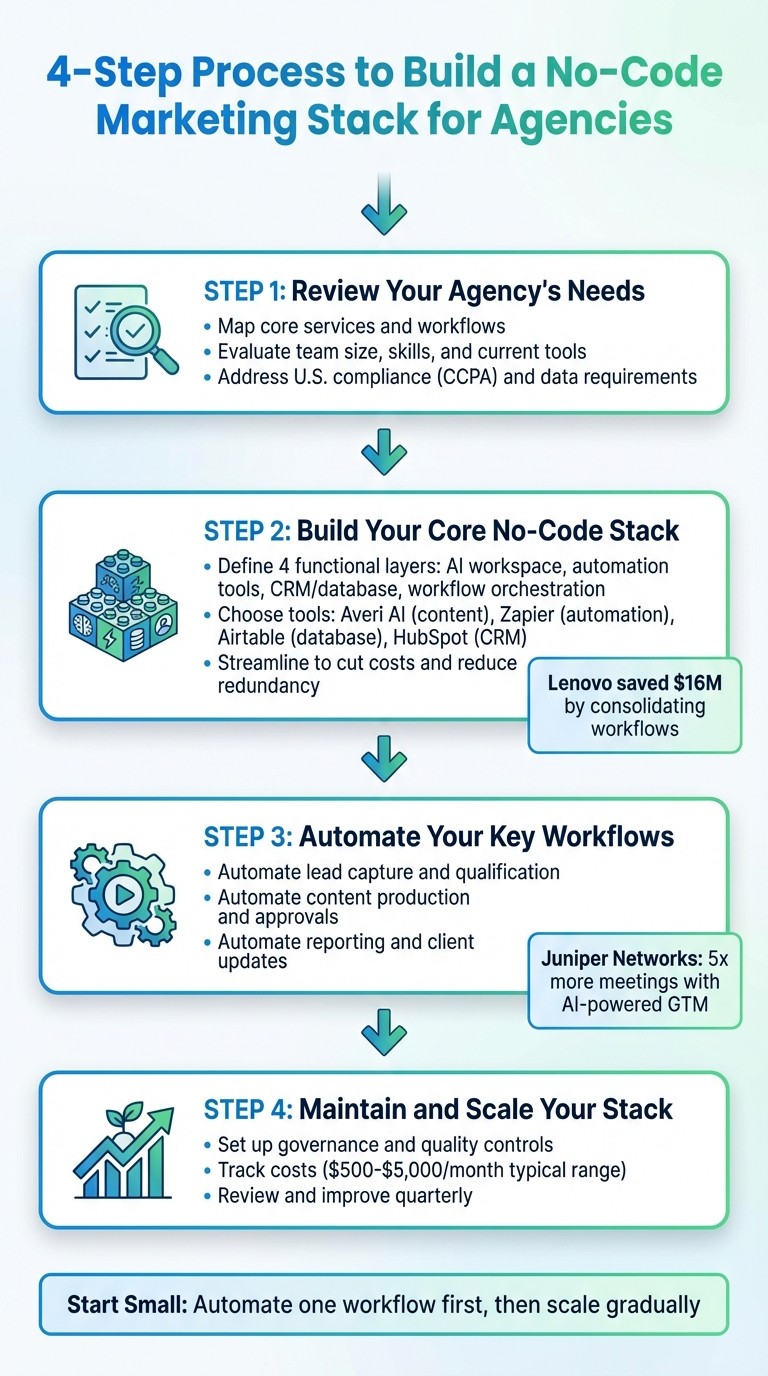
4-Step Process to Build a No-Code Marketing Stack for Agencies
Step 1: Review Your Agency's Needs and Current Workflows
Map Your Core Services and Workflows
Start by outlining the key services your agency provides - prospecting, content creation, inbound lead management, account-based marketing (ABM), translation, and deal coaching. Break down the workflow for each service, from initial brief to final delivery, and identify any steps that are manual or time-consuming.
Pay special attention to repetitive tasks or processes that require coordination across multiple tools. For example, if your content team spends hours researching accounts before crafting personalized outreach emails, or if your lead qualification process involves manually enriching contact data from several platforms, these are excellent candidates for automation. Creating a centralized hub for company information, brand voice guidelines, and best practices can also streamline workflows and ensure consistency across client projects.
Evaluate Team Size, Skills, and Current Tools
Take stock of your current tech stack and look for signs of "GTM Bloat" - a clutter of disconnected tools that slow down your team's productivity. Identify workflows that are both slow and expensive, as these are prime areas for automation to make the biggest impact.
Ashley Levesque, VP of Marketing at Banzai, shared, "I didn't know AI workflows could streamline operations until I discovered Copy.ai." [1]
Next, assess your team’s capabilities and any gaps in skills or tools, especially around data integration and workflow best practices. This evaluation will help highlight areas where a more unified solution could improve efficiency.
Once you've reviewed your internal setup, the next step is to ensure that your chosen tools meet all legal and compliance requirements.
Address U.S. Compliance and Data Requirements
After mapping your services and assessing your tools, confirm that any no-code platforms you consider comply with U.S. data privacy laws like the California Consumer Privacy Act (CCPA) and other relevant regulations. Agencies that handle client data must prioritize platforms with robust security features, clear data retention policies, and transparent terms regarding intellectual property. This is particularly important when using AI-powered tools that process sensitive customer information or proprietary brand assets.
Review each platform's compliance credentials, including data processing agreements, certifications, and enterprise-grade security options, to ensure they align with both your agency’s and your clients’ requirements. This step is essential for safeguarding data and maintaining trust.
Step 2: Build Your Core No-Code Stack
Define the Functional Layers You Need
Once you've mapped out your workflows and compliance requirements, it's time to pinpoint the functional layers your stack must support. For most agencies, this means focusing on five key areas: content creation and management, lead generation and qualification, account-based marketing (ABM), translation and localization for global clients, and data unification with workflow automation. The objective here is to avoid piecing together a patchwork of disconnected tools that can lead to inefficiencies and unnecessary complexity.
Choosing a unified platform can make a real difference. Lenovo, for example, saved $16 million last year by streamlining their workflows onto a single platform [1].
"Copy.ai has been phenomenal in transforming the way we develop marketing content. By automating workflows that would typically take weeks and cost thousands of dollars through agencies, they've saved us $16 million dollars this year alone." - Roman Olney, Head of Global Digital Experience, Lenovo [1]
Tools to Consider for Each Layer
For content creation, look for tools that can handle everything from SEO articles and thought leadership pieces to use cases and social media content, all while maintaining a consistent brand voice. For lead generation, prioritize solutions that can research accounts, draft outreach materials, and automatically enrich and engage leads to speed up the process. ABM tools should provide deep insights into target accounts and help create tailored, scalable assets, while translation tools should offer real-time, high-quality results that match native speaker standards.
The data unification layer is crucial for bringing everything together. It consolidates data and automates workflows, ensuring smoother operations. For instance, Juniper Networks reported generating five times more client meetings in 2025 by leveraging Copy.ai's personalized, AI-powered GTM strategy [1].
Once you've identified the right tools, take a close look at your current stack to ensure you're not duplicating functionality.
Streamline to Cut Costs and Improve Efficiency
An integrated, streamlined stack not only reduces expenses but also simplifies day-to-day operations. Conduct a thorough review of your tools to identify overlapping features. Many agencies discover they are paying for multiple platforms that perform similar tasks - such as one tool for content generation, another for lead enrichment, and yet another for reporting. Consolidating these functions into a single, AI-driven platform can eliminate redundancies and lower overall costs. Agencies often uncover new workflow automation capabilities they hadn't considered until they explored unified solutions.
Establish a clear budget for your stack and monitor monthly expenses, including seat licenses and add-ons. Focus on platforms with transparent pricing models and broad integration capabilities [1].
Step 2: Build Your Core No-Code Stack
Identify the Functional Layers You Need
To build an effective no-code stack, focus on four essential functional layers: an AI marketing workspace for content creation, automation tools to handle repetitive tasks, a CRM or database to manage client and prospect information, and a workflow orchestration system to unify processes and deliver actionable insights. The AI marketing workspace is your go-to for everything from strategic planning to drafting content. Automation tools connect your systems and trigger actions based on specific events, while your CRM stores and tracks client interactions.
The goal is to select tools that work together seamlessly without requiring custom coding. As Ashley Levesque, VP of Marketing at Banzai, shared: "I didn't even know AI workflows were something that I was lacking until someone said, 'Did you know you could do all of this with Copy.ai?'" [1]. By consolidating redundant functions into a unified platform, you can simplify your operations. Next, let’s explore some tool recommendations for each layer.
Tool Recommendations for Each Layer
For your AI marketing workspace, platforms like Averi AI can be a game-changer. Averi combines strategic thinking, content creation, and collaboration in one system. Its Synapse architecture intelligently directs tasks between AI-driven generation and human input, reducing the need to juggle multiple tools. Key features include Brand Core for storing your brand’s voice and guidelines, a /create mode to turn briefs into polished content, and a Library that uses past projects to enhance future work. Averi offers a Free plan with 200 AI tokens per month, while the Plus plan ($45/month) unlocks advanced features like multi-tab workflows and 1,200 tokens.
For automation, Zapier is a trusted favorite among U.S. agencies. It connects thousands of apps without requiring code, enabling workflows like adding new leads to your CRM, sending Slack alerts, or creating tasks in project management tools. Airtable is another excellent choice, blending the simplicity of spreadsheets with the capabilities of a full database. For your CRM, HubSpot’s free tier is a solid starting point, offering contact management, email tracking, and basic automation. As your agency grows, HubSpot’s scalable paid plans can meet evolving needs.
For U.S.-based agencies, compliance with data privacy regulations is critical. Many tools offer data processing agreements (DPAs) and U.S.-based data storage options, making it easier to adhere to domestic requirements. With these tools in place, the next step is to eliminate redundancies and optimize costs.
Reduce Redundancy and Control Costs
It’s common for agencies to subscribe to multiple tools that perform overlapping functions - one for content creation, another for lead enrichment, and yet another for workflow automation. However, a single unified platform can often handle these tasks more efficiently. Regular audits of your tool stack can help identify redundancies and ensure you're getting the most out of your investments. Prioritize platforms with clear pricing and broad integration options to streamline your operations and cut unnecessary expenses.
Step 3: Automate Your Key Workflows
Automate Lead Capture and Qualification
With your core tools set up, the next step is to streamline how leads are captured and managed. By integrating forms directly into your CRM through tools like Zapier, you can eliminate manual data entry. For instance, when a prospect fills out a contact form, Zapier can immediately add their details to HubSpot, alert your sales team via Slack, and send a welcome email - all in one seamless process. To keep everything running smoothly, ensure your settings are aligned across all platforms.
For lead qualification, automation takes the heavy lifting out of sorting and prioritizing. AI-powered platforms can quickly research and enrich lead data, helping you identify high-value prospects in seconds. By automating qualification criteria, your team can focus on nurturing the most promising leads instead of spending time on manual research. This integrated approach unifies your data and operations, replacing scattered tools with a single, cohesive system.
Once you've optimized lead workflows, you can turn your attention to speeding up content creation.
Automate Content Production and Approvals
Content creation often eats up a significant chunk of time in agency workflows, but automation can drastically shorten the process. Platforms like Averi AI simplify everything - from initial briefs to final drafts - within a single workspace. Using Averi's /create mode, you can transform client briefs into polished blog posts, social media updates, or email campaigns in just minutes. Its three-step process (Discuss → Draft → Edit) ensures content stays aligned with your brand while eliminating the need to juggle multiple tools.
For approvals, automation keeps things moving efficiently. By linking Averi to your project management system through Zapier, you can automatically create tasks in Asana or notify clients via Slack when drafts are ready for review. If expert input is required, Averi’s Human Cortex feature allows specialists to step in, view the full context, and make real-time edits. This streamlined system replaces fragmented workflows, saving time and reducing bottlenecks.
With content production running smoothly, the next focus is ensuring clients are always up-to-date with automated reporting.
Automate Reporting and Client Updates
Manual reporting can be a time sink, but automated dashboards make it effortless. Tools like Looker Studio (formerly Google Data Studio) and Databox can pull data directly from platforms like Google Ads, Facebook Ads Manager, and your CRM, creating real-time dashboards. You can schedule reports to be emailed - say, every Monday at 9:00 AM EST - complete with the latest metrics. For smaller agencies, the free tiers of these tools often provide everything you need.
For more advanced reporting, connect your ad platforms and CRM to an automation tool like Zapier. For example, Zapier can send out weekly summary emails with key metrics like cost per lead, conversion rates, and total ad spend in U.S. dollars. If a campaign's cost per acquisition goes over the target, it can trigger an alert to your team, allowing you to address issues before they escalate. This proactive reporting approach not only keeps clients informed but also helps you stay ahead of potential problems.
Step 4: Maintain and Scale Your Stack
Set Up Governance and Quality Controls
Once your workflows are automated, the next step is ensuring your stack remains organized, secure, and scalable. Start by defining clear user roles and permissions within each tool. Decide who can create, edit, or approve content to maintain control without micromanaging. Centralizing brand guidelines is another key move. This ensures consistency across all content, whether it’s created in-house or by external contributors, without requiring constant supervision.
Data security should also be a top priority, especially when handling sensitive client information. Choose tools that provide enterprise-grade encryption and adhere to privacy standards like GDPR and CCPA. Additionally, enable privacy settings that prevent your data from being used to train AI models - this small step can help you sidestep compliance headaches in the future.
Track Costs and Optimize Tool Usage
Agency tools can cost anywhere from $500 to over $5,000 per month, depending on your team size and the features you need. To keep expenses in check, conduct regular audits to identify underused tools and consolidate overlapping functionalities. For example, if multiple tools offer similar features, consider switching to a single, comprehensive platform.
Keep tabs on spending by tracking cost per user, renewal dates, and usage metrics. If a tool costs $200 a month but barely gets used, it’s worth reconsidering. Regular audits help ensure your budget is allocated to tools that actually bring value, paving the way for ongoing improvements.
Review and Improve Over Time
To keep your stack efficient in the long run, plan for regular evaluations. Schedule quarterly reviews to assess what’s working and identify areas that need adjustment. Pay attention to metrics like time saved on content creation, the number of qualified leads generated, and conversion rates from lead to meeting.
Jean English, the former Chief Marketing Officer at Juniper Networks, highlighted the impact of streamlined workflows:
"Thanks to Copy.ai, we're generating 5x more meetings with our personalized, AI-powered GTM strategy." [1]
As your client base grows, consider targeted integrations to enhance your stack - like linking your CRM to ad platforms for better attribution tracking. These periodic reviews ensure your stack evolves alongside your agency. The focus shouldn’t be on adding more tools but on making your existing setup smarter and more efficient over time.
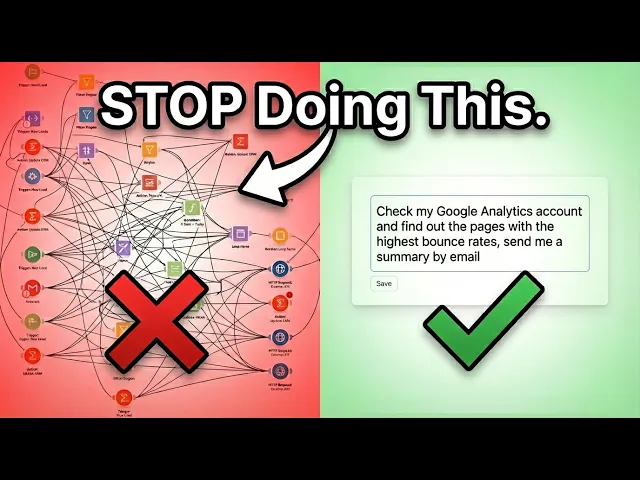
I Built a Marketing Workflow in 45 Seconds (No Code Needed)
Conclusion
Creating a no-code marketing stack doesn’t require a hefty budget or advanced technical skills. Start by evaluating your current workflows to pinpoint where time or money is slipping through the cracks. From there, choose tools that directly address these challenges. The aim isn’t to chase after every trendy platform - it’s to build a streamlined system that cuts through inefficiencies and lowers operational expenses. This streamlined setup can then serve as the backbone for scalable growth.
Many agencies have already seen notable savings by simplifying their workflows. As you look to expand beyond your initial setup, platforms like Averi AI offer a compelling option. They bring together AI-driven content creation and human expertise into a single workspace, enabling a seamless transition from strategy to execution - all while maintaining full context. Start with a focused pilot project to measure its impact before committing to a broader rollout.
Begin small - automate a single workflow like lead capture, approval processes, or reporting. Once you see measurable results, you can scale up gradually. The most effective no-code stack is one that adapts to your agency’s growth, rather than overwhelming you with unnecessary complexity from the start.
Choose tools that consolidate your systems, unify your data, and empower your team to work smarter and faster. A well-integrated no-code stack means spending less time juggling tools and more time delivering meaningful results for your clients.
FAQs
What advantages does a no-code marketing stack offer for agencies?
A no-code marketing stack brings several benefits to agencies, such as quicker campaign rollouts, less reliance on technical teams, and smoother operations through automation. By using user-friendly tools, agencies can simplify their processes and dedicate more energy to strategic planning and creative efforts.
With little to no technical knowledge needed, teams can design scalable, AI-driven marketing workflows customized to meet their unique goals. This approach boosts flexibility, responsiveness, and cost efficiency, making it a smart choice for agencies aiming to refine their marketing strategies.
How can agencies stay compliant with data privacy laws when using no-code tools?
To stay aligned with data privacy laws, agencies should implement well-defined data management policies and choose no-code tools equipped with strong security measures and compliance capabilities. Focus on tools that meet standards such as GDPR and CCPA, and ensure they offer features like data anonymization and user consent management.
It’s also important to routinely review your agency's data handling practices to pinpoint potential risks and ensure ongoing compliance. Training your team on privacy protocols is equally essential to keep workflows consistent with legal obligations.
What are the best tools to automate content creation and manage leads effectively?
When it comes to automating content creation, Copy.ai stands out as a solid option. This tool leverages AI to produce content quickly and efficiently, making it a go-to choice for creating blogs, crafting ads, or managing social media posts. For handling lead management, Zapier simplifies workflows by seamlessly connecting different apps, while Airtable provides an adaptable platform to organize and monitor leads with ease. Together, these tools can simplify operations, save valuable time, and boost productivity for agencies.