Dec 22, 2025
How to Create AI-Assisted Content Workflows for Creators & Influencers

Averi Academy
Averi Team
8 minutes

In This Article
Map, automate, and scale content with AI: build repeatable workflows, centralize brand assets, set guardrails, and blend AI with human oversight.
Updated:
Dec 22, 2025
Don’t Feed the Algorithm
The algorithm never sleeps, but you don’t have to feed it — Join our weekly newsletter for real insights on AI, human creativity & marketing execution.
AI is transforming content creation by helping creators save time, boost output, and maintain quality. With the influencer marketing industry surpassing $24 billion in 2024, the demand for consistent, high-quality content is higher than ever. AI-assisted workflows can automate up to 80% of repetitive tasks, freeing creators to focus on their unique ideas.
Key benefits include:
Saving over 10 hours per week by automating tasks like ideation, drafting, and scheduling.
Scaling production without compromising quality, as seen with brands like Wyndly, which increased content output by 5x and boosted traffic 20x using AI.
Combining AI tools like Averi, Canva, and ChatGPT with human oversight for a balanced and efficient workflow.
This guide explains how to map out your content process, integrate AI tools effectively, and build workflows tailored to different formats like videos, carousels, and newsletters. Learn how to centralize brand assets, set clear automation rules, and track performance to refine your systems over time.
The Latest AI-Powered Content Creation Workflow for Business (Speed Challenge!)

Mapping Your Content Workflow: End-to-End Framework
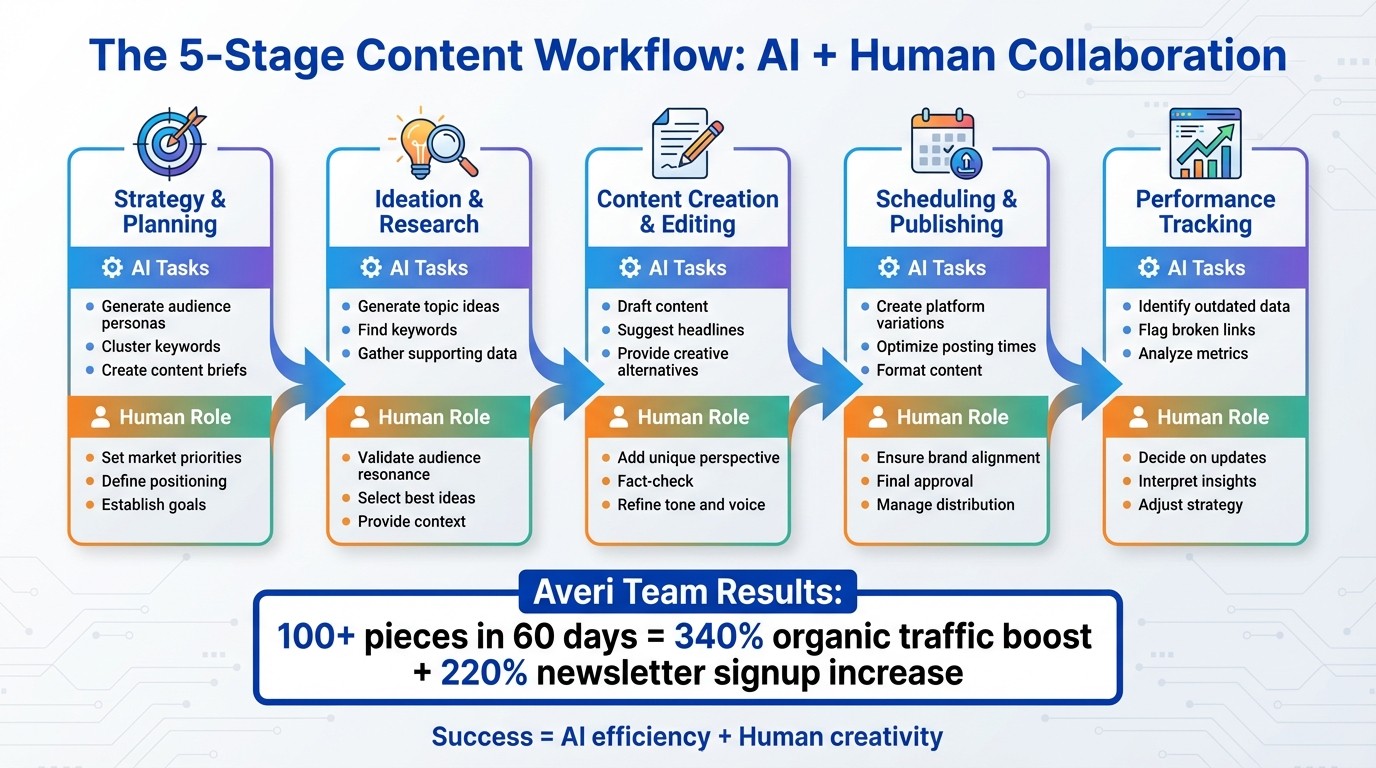
5-Stage AI-Assisted Content Workflow Framework for Creators
Before diving into automation, it's crucial to map out your content process from start to finish. Many creators find themselves bouncing between brainstorming, drafting, editing, and publishing without a clear system. While this approach might work for a few posts each week, it quickly falls apart when managing multiple platforms or scaling up.
A structured workflow acts as a roadmap. It defines each stage of your content process, assigns responsibilities, and pinpoints potential bottlenecks. The aim isn’t to automate everything but to streamline repetitive tasks, freeing you to focus on the creative decisions that make your content stand out. It’s about blending AI’s efficiency with human creativity.
Stages of a Typical Content Workflow
Every piece of content - whether it’s a TikTok video, Instagram carousel, or email newsletter - goes through five key stages: strategy and planning, ideation and research, content creation and editing, scheduling and publishing, and performance tracking.
Strategy and planning: Identify your target audience, set clear goals, and select the platforms you’ll prioritize. AI tools can assist by generating briefs that help define tone, keywords, and consistency.
Ideation and research: Develop topic ideas, find relevant keywords, and gather supporting data. AI can quickly generate ideas, but it’s up to you to ensure they resonate with your audience.
Content creation and editing: Use AI for first drafts, alternate headlines, or creative suggestions, but add your unique perspective and verify all information.
Scheduling and publishing: Post your content at the best times for maximum visibility across your chosen platforms.
Performance tracking: Use analytics to find high-performing topics and identify older posts that could benefit from updates.
Between March and May 2025, the Averi Team built a “content machine” that published over 100 pieces in just 60 days. By pairing AI for initial drafts with human editors to refine the tone, they achieved a 340% boost in organic traffic and a 220% increase in newsletter signups [2]. Their success came from carefully mapping each stage and assigning roles for both AI and human contributors.
Once your workflow is mapped out, it’s time to explore where automation fits in.
Finding Automation Opportunities
Look for tasks that are repetitive and rule-based - those that consume time but don’t require strategic or creative input. Examples include generating post ideas, scheduling content, analyzing performance data, and repurposing content for different platforms.
AI can, for instance, scan your best-performing content and suggest fresh angles on similar topics. It can also break down a single long-form video into smaller assets like social media captions, email subject lines, or blog summaries.
A telehealth platform scaled its output from 40 to 200 articles per month using similar automation strategies, achieving a 20x increase in organic traffic [4]. Their approach automated research and drafting while leaving final edits and fact-checking to human oversight.
Workflow Stage | AI Tasks | Human Responsibility |
|---|---|---|
Planning | Generating audience personas, clustering keywords | Setting market priorities and positioning |
Creation | Drafting content, suggesting creative ideas | Adding personal insights and real-world input |
Editing | Spotting filler, jargon, and passive voice | Fact-checking and refining tone |
Distribution | Creating variations for posts and emails | Ensuring alignment with brand messaging |
Maintenance | Identifying outdated data and broken links | Deciding when to update or retire content |
Creating Checklists and SOPs
Once you’ve identified automation opportunities, document your process to ensure consistency. Standard operating procedures (SOPs) and checklists turn your workflow into a repeatable system, making it easier to collaborate with a team or scale your efforts.
For example, a YouTube video checklist might include steps like researching keywords, writing a script, recording, editing, designing a thumbnail, uploading, and scheduling. An Instagram carousel checklist could include brainstorming, outlining key points, designing slides, writing captions, scheduling, and engaging with comments.
SOPs should also establish boundaries for AI use. Define “forbidden use cases,” such as fabricating quotes, creating testimonials, or offering legal or medical advice. These safeguards protect your brand’s credibility. By late 2024, 78% of marketing teams planned to enhance their AI capabilities [5], and the most effective ones paired AI’s efficiency with human judgment.
To keep everything organized, implement status-based workflows. Assign statuses like "Ideation", "Drafting", "Legal Review", or "Scheduled" to track each piece of content. This simple system ensures nothing gets stuck in the process and keeps production moving smoothly [5].
Choosing the Right AI Tools for Your Workflow
Once you've mapped out your workflow, the next step is selecting the right AI tools to streamline your process. The world of AI tools can feel overwhelming, but they generally fall into three main categories: workspaces, marketplaces, and point tools. Each serves a distinct purpose, and understanding these differences ensures that your tools work together seamlessly rather than adding unnecessary complexity.
Workspaces, like Averi, integrate AI capabilities with human expertise, preserving your brand's unique context. Marketplaces, such as Fiverr or Upwork, connect you with freelancers but demand more hands-on management. Meanwhile, point tools like Canva, Jasper, or ChatGPT excel at specific tasks but often lack integration. By categorizing tools this way, you can create a balanced stack that supports your workflow without creating bottlenecks.
"AI should amplify human creativity, not replace it." - Averi Team, Content Machine Guide [2]
Types of AI Tools: Workspaces, Marketplaces, and Point Tools
Workspaces are designed for handling end-to-end workflows. Take Averi, for example: its proprietary Synapse system seamlessly routes tasks between AI and vetted experts, ensuring your brand context is retained throughout planning, creation, and execution. With features like a centralized Library for storing your brand voice, audience profiles, and past projects, workspaces eliminate the need to start from scratch. This setup is perfect for creators who need consistent, on-brand output without juggling multiple tools or freelancers.
Marketplaces offer flexibility and access to a wide range of talent but require significant hands-on involvement. You'll need to invest time in drafting detailed briefs, reviewing portfolios, and managing revisions. These platforms lack built-in systems for maintaining brand consistency, making them best suited for one-off projects when you have the bandwidth to oversee the process directly.
Point tools are quick and often budget-friendly, with many offering free tiers or trials. Canva simplifies design, Jasper generates copy, and ChatGPT handles queries or brainstorming. However, these tools typically operate in isolation, requiring you to manually transfer outputs between platforms and reapply brand guidelines. They're ideal for occasional tasks or initial experiments with automation but can become cumbersome for more integrated workflows.
Recommended AI Tool Stack for Creators and Influencers
To build an efficient tool stack, integrate elements from each category for a seamless operation. Start with a workspace like Averi to handle strategy, content creation, and brand consistency. Averi can take your briefs and transform them into ready-to-publish content across platforms, all while maintaining your unique voice and guidelines. When specialized expertise is needed, you can bring in vetted professionals directly through the platform without losing context.
For additional support, pair Averi with tools like Canva for quick visual edits and social graphics. Use scheduling platforms like Later or Buffer to plan and automate posts across social media channels. Tools such as Google Analytics or platform-specific dashboards will help you monitor performance. The key to success is ensuring all these tools integrate into a central workspace that preserves your brand's guidelines and strategic objectives. Without this centralization, you risk wasting time re-briefing AI tools or freelancers for every new project.
Storing Brand Assets in One Place
Maintaining consistency becomes challenging when your brand's voice and assets are scattered across multiple tools and documents. Centralizing these assets ensures that your AI tools and collaborators consistently align with your tone, messaging, and positioning.
Averi's Brand Core feature is an excellent example of this. It centralizes your brand guidelines, mission, and customer profiles, ensuring that every draft, conversation, and expert collaboration automatically draws from the same context. When you save a project to your Library, it trains the AI to improve over time, making future projects even more streamlined. This means your tenth piece of content will be more refined than your first, with minimal extra effort.
"Successful content creators are just as good at project management as they are at writing." - Ben Pines, Wordtune [7]
It's also crucial to establish clear boundaries for AI usage. For example, prohibit AI from fabricating testimonials or providing medical advice without proper expert oversight [6]. Store these guardrails alongside your brand assets so every team member - and every AI interaction - follows the same standards. With 77% of companies now using or exploring AI for content creation [4], centralizing your brand knowledge is no longer optional; it's a necessity for consistent, high-quality output.
Building Repeatable AI-Assisted Workflows
Once you’ve got your tools in place, the next step is creating workflows that reliably turn ideas into finished content. By breaking down each content type into distinct stages and assigning specific roles to AI, you can streamline the entire process. For instance, a short-form video workflow might look like this: Ideation (AI brainstorming) → Scripting (AI outlining) → Production (AI video editing/generation) → Distribution (Automated scheduling) [1][7]. This structured approach reduces decision fatigue and ensures consistent quality, even as your output scales.
In 2025, Averi AI’s team demonstrated this with their "content machine", producing over 100 pieces of content in just 60 days. Their success came from a process where AI handled repetitive tasks, leaving humans to refine the final product [2]. Below, we’ll break down workflows for various content types, showing how strategy and execution can seamlessly align.
Short-Form Video Workflow
Creating short-form videos for platforms like TikTok, Instagram Reels, or YouTube Shorts requires both speed and consistency. Start with ideation by using prompts such as, "Generate 10 short-form video ideas about [topic] with SEO keywords and hooks." Feed your AI tool summaries of your best-performing articles or past video transcripts to uncover effective angles for scripts [1][7].
Once you’ve chosen an idea, move to scripting. AI tools can outline your video structure in minutes, breaking it into a hook, key points, and a call-to-action. For editing, tools like CapCut offer AI-powered features like auto-captions, background removal, and clip trimming. Finally, connect your content creation tools to scheduling platforms like Buffer or Zapier for automated posting across channels. With this system in place, you can produce a video in about an hour.
Time | Task | Tool Example |
|---|---|---|
0–10 min | Ideation & Outline | ChatGPT / Averi AI |
10–35 min | Write script and edit text | |
35–50 min | Create visuals and edit clips | Canva / Leonardo / CapCut |
50–60 min | Schedule & post | Buffer / Zapier |
Static Posts and Carousels
For static content like Instagram posts or LinkedIn carousels, you can adapt your workflow to focus on visuals and captions. Start by breaking down "anchor" content - such as a blog post or video - into smaller pieces that can be repurposed as individual posts or slides [3][7]. Use AI to generate multiple caption options, then choose the one that best aligns with your brand voice.
For design, Canva is an excellent tool for creating polished visuals. Pair AI-generated captions and hashtags with your graphics to simplify the process. To maintain quality, set clear guidelines: create a "forbidden use case" list (e.g., banning fabricated quotes or testimonials) [6]. Always include human sign-offs to ensure factual accuracy and consistency with your brand voice before scheduling posts [2].
Email Newsletter Workflow
Email newsletters offer a direct way to connect with your audience. To streamline this process, use AI to repurpose a single "anchor" piece of content, like a blog post or video script, into multiple newsletter formats. These can include summaries, actionable tips, or conversational openings. When drafting, prompt the AI to craft a hook that grabs attention, a friendly introduction, scannable bullet points, and a "P.S." section for added personality.
In 2025, Averi AI launched the "Don't Feed the Algorithm" newsletter using a systematic AI-assisted approach. They relied on Averi AI for first drafts and ideation, Beehiiv for newsletter management, and human editors for final adjustments. This workflow helped achieve a 47% average open rate and attract 3,400 subscribers in just eight weeks [2]. With each iteration, production time decreased while quality stayed consistent.
As Montana Thomas from Quick Sprout puts it:
"The point is not to create 'AI content.' It is to create better content, at higher velocity, with less grunt work." [6]
For newsletters, tools like Beehiiv or Mailchimp handle distribution and analytics, while AI platforms like Averi AI or Jasper assist with drafting and strategy. Use Grammarly for tone refinement and Zapier to integrate CRM data for automated triggers. AI can also generate and A/B test subject lines and preview texts to boost open rates. Treat AI-generated drafts as a starting point, then have humans verify details, add personal insights, and polish the final version to avoid robotic-sounding copy.
Improving and Scaling Your AI-Assisted Content Systems
Once your workflows are in motion, the next step is to measure their performance and refine them. Scaling an AI-assisted content system is all about treating it as a living, evolving process. The most successful creators understand this - they continually improve their systems with every blog post, email, or video. By keeping an eye on key metrics, setting clear boundaries, and knowing when human intervention is necessary, you can expand your content production while maintaining quality and staying true to your brand’s unique voice. These refinements help protect your brand identity, reinforcing earlier efforts to centralize and align brand assets.
Using Analytics to Refine Workflows
Start by tracking how efficiently your content moves from concept to publication. If AI is supposed to speed things up but your team finds themselves spending more time editing drafts, it’s a red flag. High editing times and frequent manual corrections often signal that prompts or brand voice guidelines need adjustment [6].
Engagement metrics are another critical tool. Pay attention to which AI-generated ideas resonate most with your audience and update your prompt library accordingly [3]. For paid campaigns, keep a close watch on metrics like click-through rates (CTR) and cost per thousand impressions (CPM) to evaluate how well AI-generated copy or visuals are performing.
For example, many organizations have successfully used AI-powered optimizations to save countless work hours. By focusing on the right metrics, you can identify inefficiencies and make targeted improvements that boost productivity and results.
Setting Automation Rules and Guardrails
Automation can be a double-edged sword if not carefully managed. Without clear boundaries, it may lead to inconsistencies that undermine your brand. Establish strict rules upfront, such as banning AI from generating personal testimonials, creating high-stakes legal or medical advice, or fabricating quotes. These rules should be part of your standard operating procedures and applied at every stage of your workflow.
To streamline approvals, use status labels like "AI Drafted", "Human Reviewed", and "Legal Approved" [5]. For sponsored content or partnerships, add an extra layer of review where a human ensures brand safety and compliance before anything goes live.
Another best practice is requiring your team to document which parts of a draft were AI-generated and to cite primary sources for any statistics or quotes suggested by the model. This creates accountability and simplifies the fact-checking process [6]. Nicole Replogle from Zapier emphasizes this point:
"AI workflows aren't set-it-and-forget-it machines... They need guardrails and the occasional review from an actual person." [8]
These safeguards help you strike the right balance between automation and human oversight.
When to Use AI, Human Experts, or Manual Workflows
Not all content is created equal, and neither should your workflows be. Tasks like writing alt-text, formatting, or scheduling social media posts can be fully automated without much risk. For standard content - such as blog drafts, newsletters, and social posts - a hybrid approach works best. Here, AI can handle research and drafting, while humans refine tone, verify facts, and ensure alignment with your brand. On the other hand, sensitive outputs like sponsored content or legal disclaimers demand full human oversight.
Workflow Type | Best For | Human Role | AI Role |
|---|---|---|---|
Fully Automated | Alt-text, metadata, basic translations, social scheduling | Setting rules and periodic audits | End-to-end execution |
AI-Assisted (Hybrid) | Blog drafts, newsletters, scripts, social captions | Strategy, editing, fact-checking, final approval | Research, outlining, first drafts |
Manual / Expert | Sponsored content, legal/medical, thought leadership | Full creation and strategic judgment | Minimal (grammar checking, transcription) |
Conclusion: How AI-Assisted Workflows Help Creators
AI-assisted workflows offer creators and influencers three major benefits: faster, high-quality production, consistent messaging across platforms, and the ability to grow without overwhelming workloads. By combining the right AI tools, specialized software, and human expertise, you can automate tedious tasks while keeping your personal touch intact. As discussed throughout this guide, integrating AI with human creativity can completely reshape your content strategy. Think of your workflow as a dynamic system - one that evolves and improves with every new piece of content you produce.
The examples shared earlier highlight how these workflows can significantly increase content output and engagement while preserving brand voice. This balance is achieved by blending AI's efficiency in drafting with human oversight for refinement.
The most successful creators are those who let AI handle the repetitive and time-consuming tasks, giving themselves more freedom to focus on strategy, storytelling, and the creative choices that machines simply can't replicate. While AI-generated content sets the foundation, what sets top creators apart is their ability to push beyond automation to deliver something truly engaging and memorable.
To make this transition manageable, take it step by step. Start by focusing on just one area - whether it's creating short-form videos, writing newsletters, or managing social media posts. Optimize that process until it runs smoothly, then move on to the next. Document your successes, set clear boundaries for AI's role, and use performance metrics to refine your system over time. The goal isn't to let automation take over your creativity but to enhance it by removing the repetitive tasks that slow you down.
As your brand grows, so should your workflow. The tools you select, the guidelines you establish, and the metrics you monitor today will lay the groundwork for a content engine that scales with your ambitions. This ongoing improvement is where AI truly shines, helping you create smarter, more efficient systems that amplify your creative vision.
FAQs
How does AI help creators and influencers keep their brand consistent across content?
AI plays a pivotal role in keeping brand identity consistent by turning static style guides into dynamic tools that actively ensure all content aligns with your voice and aesthetic. Tools like Jasper and Canva Magic Write can store your brand’s tone, preferred terminology, and design principles, then seamlessly integrate them into blogs, ads, and social media posts.
When it comes to visuals, AI-driven platforms such as Canva Brand Kit and Brandfolder help maintain design uniformity. They automatically apply your brand’s colors, fonts, and logos across all assets, ensuring everything looks cohesive. These tools can even resize visuals for various platforms without sacrificing the overall design, making it simpler to maintain a polished and consistent appearance across channels.
AI also serves as a quality-control checkpoint, scanning drafts for any tone or design mismatches before they go live. This guarantees that every piece of content stays true to your brand’s voice and style. By doing so, creators and influencers can scale their output confidently, knowing their brand identity remains intact.
What are the best AI tools to simplify repetitive content tasks?
Some of the best AI tools for simplifying repetitive content tasks include Copy.ai, Jasper AI, Notion AI, Gumloop, Lindy.ai, and ChatGPT. Many creators also combine these tools with platforms like Trello with Butler or Airtable with AI to streamline their workflows even further.
These tools excel at handling tasks like brainstorming content ideas, drafting, scheduling, and even managing distribution. By incorporating AI into your process, you can dedicate more time to the creative and strategic aspects of your work while leaving the routine tasks to these powerful tools.
How can I make sure AI-generated content matches my brand's voice?
To make sure AI-generated content reflects your brand’s unique voice, start by developing a straightforward brand voice guide. This guide should clearly define your brand’s personality, tone, preferred vocabulary, and any topics to steer clear of. Once you have this framework, translate it into actionable instructions for the AI, and provide examples of high-quality content that embody your brand. Many AI platforms now include features like brand voice settings and terminology libraries, making it easier to enforce these standards.
Human oversight is key to maintaining quality and consistency. After the AI generates content, review it carefully using a checklist to assess tone, consistency, and adherence to your brand’s terminology. Make any necessary adjustments, and use these edits to further train the AI over time. Regular audits of published content can help ensure it stays aligned with your brand’s identity. By combining clear guidelines, AI tools, and human review, you can produce content that feels genuine while keeping the process efficient.